Plan & create
CampaignBuilder
Turn a campaign idea into a clear brief, audience direction, email drafts, and a journey your team can review.
- Campaign planning
- Specialist AI agents
- Brand and knowledge context
Built for Salesforce Marketing Cloud Engagement
Bring campaign planning, AI creative, and Marketing Cloud production into one connected workflow. Give your team better drafts, clearer handoffs, and control over what goes live.
The Campaign app family
Four independently useful apps. One shared platform direction. Choose the work you want to improve, then explore it with us.
Plan & create
Turn a campaign idea into a clear brief, audience direction, email drafts, and a journey your team can review.
Build & repeat
Make repeatable production work easier with configured templates, folders, Data Extensions, and reviewed Marketing Cloud assets.
Create in context
Bring reusable Content Blocks and Image Blocks into Content Builder. Designed as a free product in the new app family.
Measure & understand
A dedicated experience for journey performance, comparisons, and measurement evidence. Join the preview as the product develops.
The independent app family is being rolled out. Demo availability and enabled capabilities depend on your workspace; we will confirm the scope with you.
Inside the app
Campaign Builder gives marketers and admins a focused workspace for the work that happens before Content Builder assets and Journey Builder drafts are reviewed in Marketing Cloud.
Campaign control
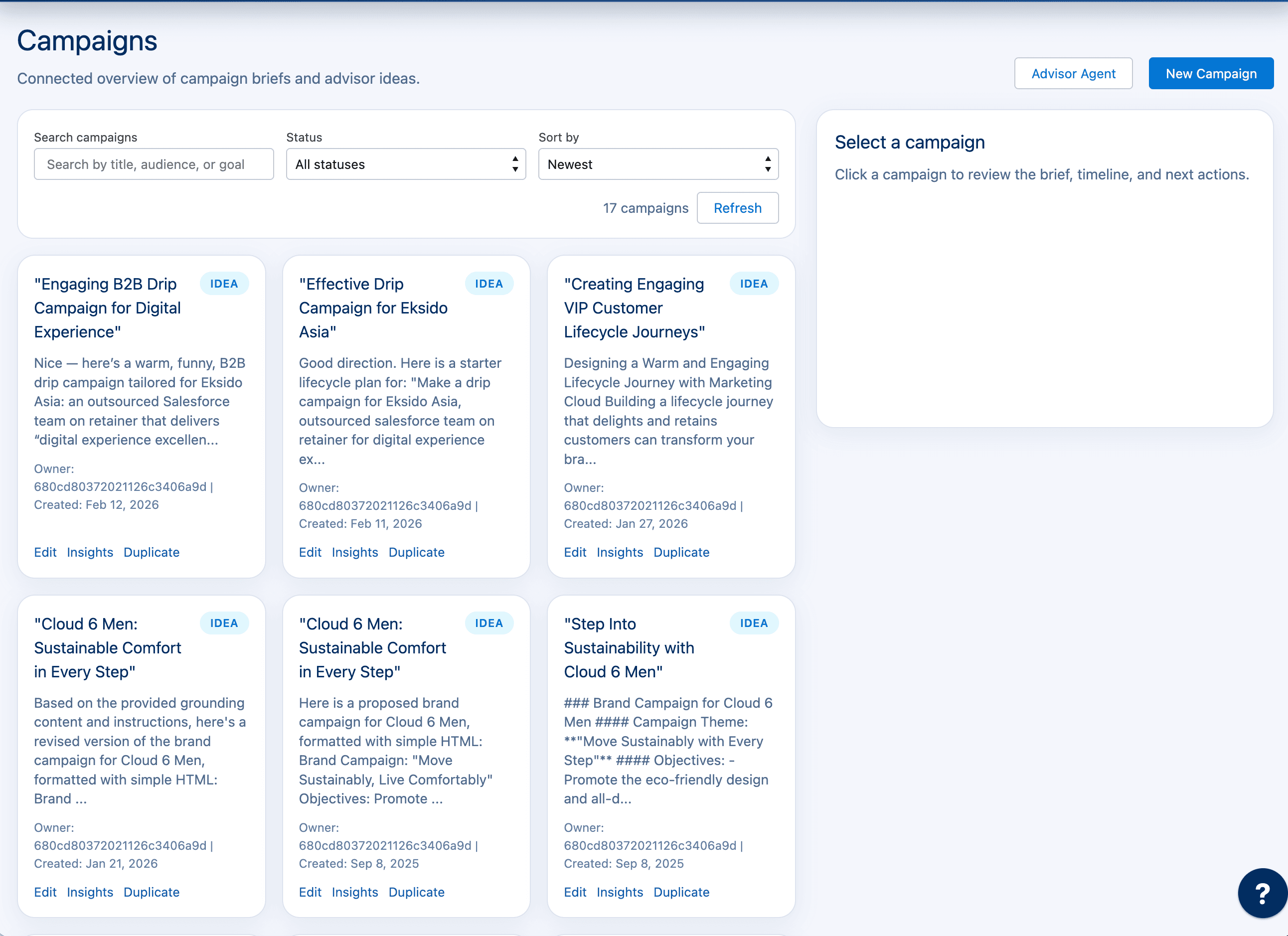
Give marketers a single place to turn goals, audiences, messages, and channel plans into Marketing Cloud draft work.
Content generation
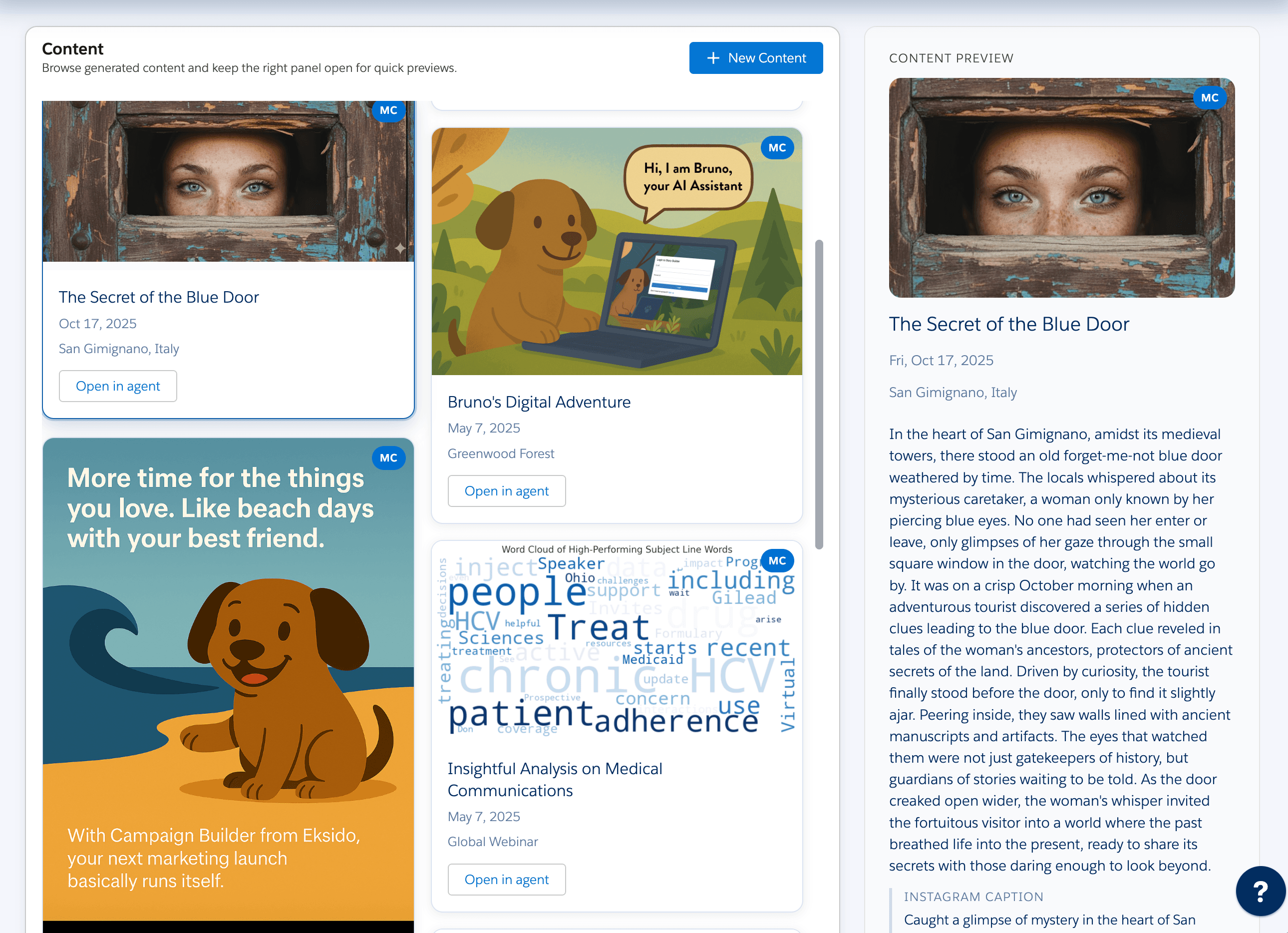
Bruno creates first drafts, variants, subject lines, and campaign copy while keeping team review and brand context visible.
Admin setup
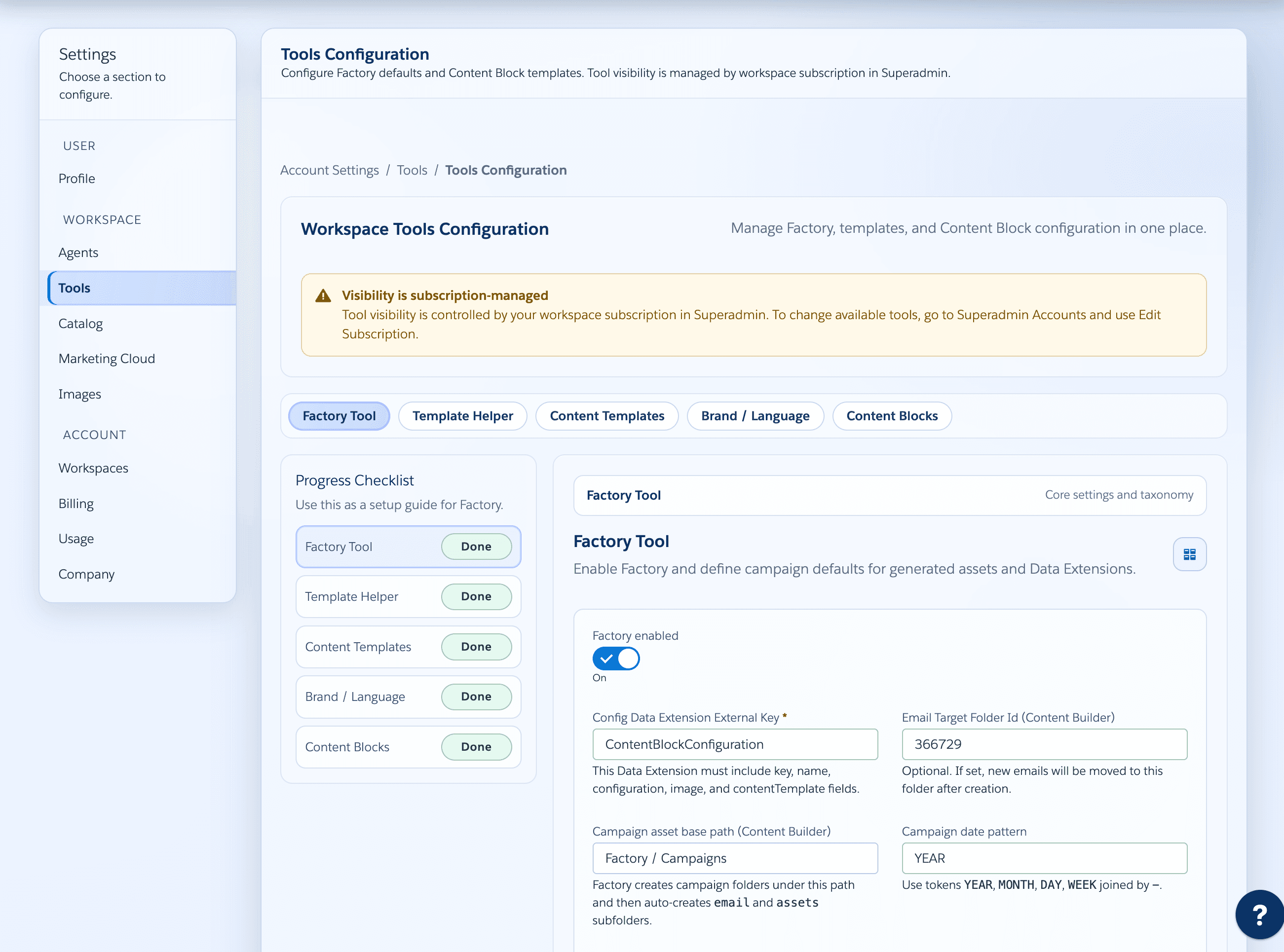
Admins can standardize content blocks, factory defaults, brand language, and rollout settings across the Marketing Cloud org.
Campaign workflow
Describe the audience, objective, offer, and channels in natural language.
Create campaign ideas, copy variants, journey notes, and content blocks.
Map generated assets to your approved Marketing Cloud templates and brand defaults.
Move faster from approved brief to reviewed draft artifacts for Salesforce Marketing Cloud.
Where we are going
The next chapter connects planning, production, and measurement through shared campaign context. Talk to us about an early pilot shaped around your team's workflow.
Discuss your pilotConnect campaigns, audiences, journeys, emails, and assets through shared identities and traceable relationships.
Bring journey measurements and comparisons into a dedicated analytics experience. Email-level attribution is a future extension.
Use governed evidence and learning to inform future decisions. This is a development direction, with human review built into the design.
Use cases
Campaign Builder is easier to evaluate when each workflow is concrete. These pages explain the implemented paths for Content Blocks, Journey creation, Email generation, Data Extensions, Factory production, SFMC connection readiness, Advisor guidance, and Bruno orchestration.
Turn campaign intent, uploads, and workspace knowledge into normalized briefs, build packages, and Bruno-ready execution specs.
Create and publish reviewed Content Builder assets and reusable block content from campaign context.
Plan, clone, or create Journey Builder drafts while keeping activation manual inside Marketing Cloud.
Search, preview, copy, rewrite, translate, and update SFMC emails through confirmed write paths.
Translate campaign copy, email fields, HTML, slots, and Content Builder-ready variants while preserving SFMC tokens and review boundaries.
Plan audience structures, create Factory Data Extensions, and read scoped Data Extension rows where configured.
Prepare SFMC campaign drafts, folders, image uploads, Data Extensions, template emails, previews, variants, and template reviews.
Validate credentials, token context, BU-to-workspace mapping, and admin setup before agent or Factory execution.
Review campaign strategy with account-grounded knowledge, saved recommendations, snippet context, feedback, and async job support.
Route campaign work across specialist skills, pending inputs, confirmed writes, dry runs, and resumable Factory-backed execution.
Verify account scope, entitlements, dry-run evidence, Factory prerequisites, confirmed writes, and manual SFMC launch boundaries.
Trust model
Campaign Builder's strongest trust story is already in the implementation: authenticated account context, entitlement checks, tenant and workspace scoping, confirmed write paths, request tracing, redacted logs, CSRF protection, security headers, and encrypted SFMC secrets.
Campaign Builder uses authenticated account, tenant, workspace, enterprise, and business-unit context before agent workflows or Marketing Cloud operations run.
SFMC credentials stay server-side and encrypted in the product implementation; production-bound writes are scoped, previewed, and confirmed instead of hidden inside chat.
The implementation documents request IDs, redacted logging, CSRF checks for mutating browser requests, security headers, entitlement gates, and safer error formatting.
Bruno AI
Campaign assistant online
Bruno AI
Bruno helps marketers translate plain-English campaign intent into structured content, audience notes, and review-ready draft assets that fit your Salesforce Marketing Cloud setup.
Read the Bruno orchestration modelJoin the Bruno waitlist
Salesforce ecosystem
Campaign Builder runs alongside Salesforce Marketing Cloud Engagement: installed-package sessions, Content Builder assets, Journey Builder drafts, email asset workflows, audience planning, and business-unit workspaces. Journey activation remains a manual Marketing Cloud step.
Runs from Marketing Cloud with signed-request or OAuth session handling and business-unit context.
Generates, updates, and publishes approved content assets into Salesforce Marketing Cloud Content Builder.
Plans, clones, and creates draft journeys for manual review before activation inside Journey Builder.
Searches, previews, rewrites, translates, copies, and updates accessible Marketing Cloud email assets.
Supports audience planning and Data Extension reads for scoped campaign and journey workflows.
Maps Marketing Cloud enterprises and business units to Campaign Builder tenants and workspaces with audit trails.
Screenshots
The public site should show the product doing the work: campaign planning, Bruno-led content production, and configured Marketing Cloud setup.
Campaign workspace
Campaign Builder captures objectives, audiences, messaging, channel direction, and draft history before work moves into Marketing Cloud assets.
Bruno and content
Bruno routes work to Campaign, Content, Email, Journey, Image, localization, Advisor, and Factory flows while keeping review steps visible.
SFMC setup
Admin setup supports templates, blocks, brand language, Factory defaults, subscription-managed access, and SFMC-connected production paths.
From idea to SFMC execution
Campaign Builder is not a standalone content generator. It connects campaign planning, content, email, journey, image, localization, and Factory workflows to the Salesforce Marketing Cloud assets your team already reviews and launches.
Use these pages to understand how Campaign Builder coordinates agents, Factory, SFMC operations, and confirmed write boundaries before evaluating individual workflows.
Check authentication, business-unit mapping, account-scoped credentials, pilot evidence, production handoff evidence, security guardrails, and reviewed production write paths.
Review the implemented agent surfaces for planning, content, email, audience, journey, image, localization, account-grounded recommendations, and workspace knowledge reuse.
Turns an idea, upload, or workspace context into a normalized brief, audience direction, email plan, Data Extension plan, journey plan, validation warnings, and a Bruno-compatible campaignSpec.
Create content from briefs, images, and existing assets; generate variants; preview SFMC emails; rewrite or translate copy; and apply safer subject, preheader, HTML, or slot updates only through confirmed write paths.
Builds Journey Builder draft plans from chat or uploaded briefs, searches or clones reference journeys, drafts email copy, checks readiness, and keeps activation as a manual Marketing Cloud step.
Supports provider search, generation requests, saved image assets, SFMC image insertion, and shared localization fields that preserve language, tone, and HTML intent across Bruno, Content, and Email flows.
Bruno discovers entitled skills, gathers missing inputs, previews write actions, and runs durable campaign execution with dry-run, resume, and request journaling support.
Factory creates campaign drafts, Content Builder folders, image uploads, Data Extensions, template-based emails, preview drafts, variant previews, and AI template reviews.
Campaign Builder reads and writes Content Builder assets, email assets, journeys, entry events, folders, and Data Extensions through authenticated account or workspace Marketing Cloud connections.
Authentication, entitlements, BU-to-workspace mapping, tenant scoping, CSRF checks, security headers, redacted logging, request IDs, and encrypted SFMC secrets bound execution to the right account.
Technical evaluator notes
Campaign Builder is designed for reviewed execution: it moves campaign work toward SFMC assets, previews, folders, Data Extensions, and draft journeys while preserving human approval at the points that change production systems.
Factory and agent workflows can prepare campaign drafts, Content Builder folders, uploaded images, Data Extensions, template-based emails, preview drafts, and draft journeys. Journey activation stays inside Marketing Cloud for manual review.
Bruno discovers entitled skills, collects missing inputs, shows pending write actions with preview summaries, and can run campaign execution through the Bruno campaign endpoint after confirmation.
Campaign Builder can search and retrieve accessible email assets, Content Builder assets, folders, journeys, event definitions, and Data Extension rows through the connected account or workspace Marketing Cloud credentials.
Production writes require authentication, entitlement checks, tenant and workspace scoping, request tracing, and explicit confirmation for SFMC email copy/update, image insertion, content publishing, Factory, and Bruno write-skill execution.
SFMC operation matrix
Campaign Builder is easiest to evaluate when each demo action is mapped to an implemented Salesforce Marketing Cloud boundary: safe read, draft creation, confirmed write, or manual launch step.
Open the full SFMC operations indexEmail, Content, Journey, Image, Data Extension, and folder workflows retrieve accessible SFMC records through the mapped account or workspace connection before proposing changes.
Inspect read pathsCampaign Agent build packages, Journey draft plans, Factory campaign drafts, Content Builder folders, image uploads, Data Extensions, template emails, previews, variants, and template review all produce reviewable artifacts.
Review Factory draftsEmail copy or update, Content Builder saves, image insertion, Factory production, and Bruno write-skill execution require entitlement checks, scoped credentials, pending action previews, and request tracing.
Check write boundariesJourney Agent and Marketing Cloud draft creation keep activationReadiness, blocker warnings, EMAILV2 notes, entry-event follow-up, send approval, and Journey activation visible for human review in SFMC.
Verify Journey handoffDemo proof path
A strong demo should leave traceable artifacts from the implemented workflow: Campaign Agent planning, Bruno orchestration, Factory readiness, SFMC draft outputs, and the manual Marketing Cloud launch boundary.
Review the SFMC pilot planCapture the normalized brief, audience direction, email content plan, Data Extension plan, journey plan, validation warnings, build package, grounding references, and Bruno-compatible campaignSpec.
Inspect entitled skills, missing inputs, pending write actions, preview summaries, proposed stages, artifact ledger, request journal, resume behavior, and manual Journey activation warnings before confirming work.
Verify mapped enterprise and business-unit context, account-scoped Marketing Cloud credentials, token context, tool:factory entitlement, settings.factory.enabled, configured templates, and folder or Data Extension prerequisites.
Confirm what was prepared as a draft: Content Builder assets, email copies or updates, localized variants, image insertion, Data Extensions, Factory previews, template reviews, and Journey Builder drafts that still require manual activation.
Buyer proof checklist
Use this checklist to keep a Campaign Builder evaluation concrete: every claim should map to implemented routes, scoped account context, dry-run evidence, preview artifacts, or reviewed draft outputs inside Salesforce Marketing Cloud.
Capture auth source, enterprise ID, business unit ID, tenant ID, workspace ID, token-context result, CSRF behavior for browser writes, and requestId on failures.
Connection readinessShow which Campaign, Content, Email, Journey, Image, Translator, Advisor, Audience, Bruno, content-block, and Factory capabilities are enabled for the account.
Security evidenceKeep the normalized brief, uploaded-context references, grounding references, validation warnings, Data Extension plan, journey plan, and Bruno-compatible campaignSpec.
Campaign Agent workflowReview missing inputs, entitlement-filtered skills, pending write summaries, proposed stages, artifact ledger, request journal, resume behavior, and manual Journey activation warnings.
Bruno orchestrationVerify tool:factory entitlement, settings.factory.enabled, account SFMC credentials, configured templates, Content Builder folders, image uploads, Data Extensions, email previews, variants, and template review.
Factory workflowSeparate reads, previews, draft creation, confirmed writes, and manual-only launch controls before treating any output as ready for Marketing Cloud execution.
Write boundariesWalkthrough evidence
A useful walkthrough should end with artifacts your SFMC admin can inspect: planning output, dry-run orchestration, readiness checks, scoped draft outputs, and the boundary that keeps final launch decisions inside Marketing Cloud.
Open the SFMC evidence matrixKeep the generated brief, build package, validation warnings, grounding references, Data Extension plan, journey plan, email definitions, and campaignSpec from the generate-brief or execute-campaign flow.
Review entitled skills, missing inputs, pending write summaries, proposed stages, artifact ledger, request journal, resume behavior, and manual Journey activation warnings before confirming execution.
Verify mapped BU context, account-scoped credentials, token-context results, tool:factory entitlement, settings.factory.enabled, configured templates, folder paths, and Data Extension prerequisites.
Inspect the actual draft outputs: Content Builder folders or assets, uploaded images, Data Extensions, email copies or template-based emails, preview drafts, localized variants, and Journey Builder drafts.
Pilot evidence
A useful Campaign Builder pilot should prove the same controls the implementation uses before production-bound work runs: mapped SFMC context, entitled workflows, dry-run artifacts, and reviewable draft outputs.
Start by verifying the connected enterprise, business unit, tenant, workspace, and account-scoped credentials that each agent or Factory route will use.
Use Bruno dry runs to inspect the proposed stage plan, campaignSpec, artifact ledger, request journal, and missing inputs before confirming execution.
Check the Factory entitlement, settings.factory.enabled, connected SFMC credentials, template assets, folder paths, Data Extension plans, and preview routes before asking for production drafts.
Validate that Campaign Builder creates reviewable assets and draft journeys while send approval, Journey activation, and final production decisions remain inside Marketing Cloud.
Demo booking
The fastest way to evaluate Campaign Builder is to bring one real campaign workflow: a brief-to-email path, a journey draft, a Content Builder block process, or a Data Extension production step.
Book your Campaign Builder demo
Tell us which SFMC workflow you want to evaluate first.